
How to Correlate Barcode, Dimensions and Weight in a Dynamic DWS
Keep barcode, dimensions and weight attached to one moving parcel using event IDs, tracking windows, ordered state and explicit exception handling.
Sep 22,2026 | Jasper Lee
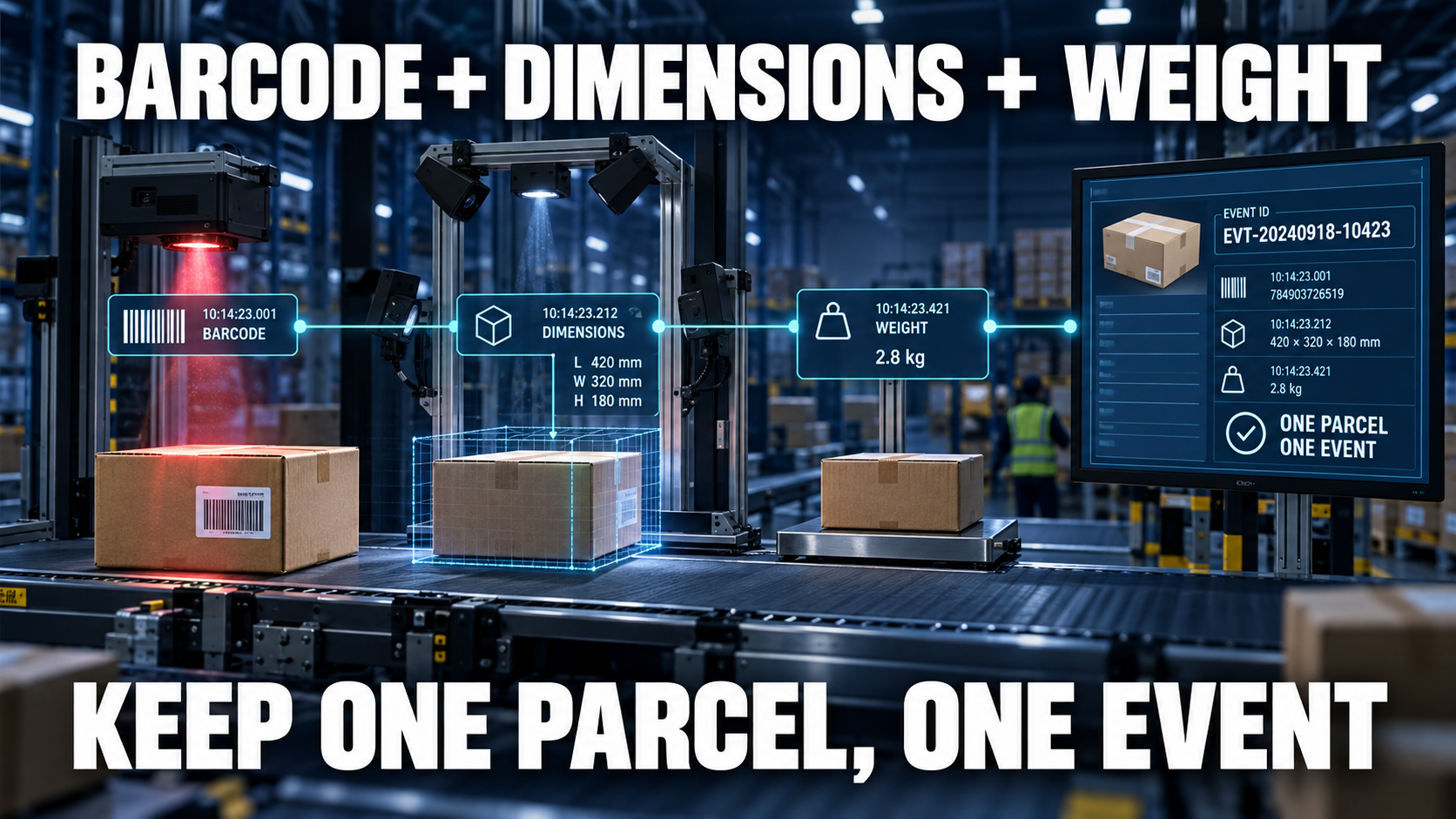
Direct answer: Correlate barcode, dimensions and weight by giving each physical parcel one tracked event through the capture zone. Associate sensor observations with that event using controlled entry order, position or encoder tracking and time windows; close it only after required data and quality checks complete. Never join streams using nearest timestamp alone when parcels can queue, overlap or be diverted.
CONLIDA is a DWS specialist focused on parcel dimensioning and physical logistics data capture. The engineering objective is a traceable physical-to-digital record, not an isolated measurement claim.
Create the event at a deterministic boundary
Use a photoeye, conveyor control point or upstream message to open one parcel event. Assign an event ID before sensor results begin arriving.
Track physical order and position
Maintain the parcel's position through scanner, dimensioner and scale zones. Define behavior for gaps, overlaps, recirculation and manual removal.
Join observations with explicit rules
Record source device, observation time and correlation window. Reject ambiguous matches instead of selecting whichever timestamp is closest.
Close on acknowledgement or exception
An event ends with accepted, rejected, diverted or cancelled state. Keep the measurement ID stable for communication retries.
Failure modes to test
| Failure mode | Operational consequence |
|---|---|
| Two parcels overlap | One barcode receives another parcel's dimensions |
| Scale settles late | Weight shifts to the following event |
| Manual removal is invisible | Tracking order becomes offset |
| Retry creates new ID | Downstream stores a duplicate |
CONLIDA Engineering Note
Correlation should be tested by deliberately breaking the ideal sequence: remove a parcel, cover a barcode, create a short gap and delay one sensor response. A system that only works when every event arrives in order has not demonstrated production correlation.
Implementation checklist
- Define the physical object and identity rule.
- Document the accepted measurement envelope and units.
- Assign ownership for quality status and exceptions.
- Test representative normal and failure cases.
- Verify acknowledgement, retry and reconciliation.
- Retain evidence and change-control history.
Topic cluster and next step
- Parent concept article: When Dynamic Dws
- Related technical article: Prevent Duplicate Dws Records
- Next-step buyer article: Questions To Ask Dws Supplier
- Relevant solution/use case: Review the application with CONLIDA
Sources
- GS1 — EPCIS and Core Business Vocabulary
- Oracle — Oracle WMS Integration API Guide
- OIML — OIML R 129-2:2020 — Metrological controls and performance tests
Related Questions
Is timestamp matching enough for a dynamic DWS?
Usually not by itself. Use tracked event identity and defined physical boundaries, with time as supporting evidence.
What happens when two parcels touch?
Mark the event ambiguous or out-of-profile and route it according to the exception design.
Should scanner and scale use the same ID?
Their observations should reference the same measurement event even if each device also keeps its own diagnostic ID.
How are retries distinguished from remeasurement?
A network retry keeps the same event ID; a new physical capture creates a new measurement ID linked to the earlier event.
Comment